Short answer: Claude Code sends your status line script a JSON object on every update, and context_window.used_percentage in it says how full the context window is. The shortest way to show it is one line in ~/.claude/settings.json: "statusLine": {"type": "command", "command": "jq -r '\"\\(.context_window.used_percentage // 0)% context\"'"}.
A long session fills the context window quietly. You notice when Claude starts forgetting what you agreed an hour ago, or when it compacts the conversation in the middle of a task. A number at the bottom of the screen tells you before that happens, so you can /compact or start a fresh session at a moment you choose.
Which fields hold the context usage?
Everything sits under context_window in the JSON your script reads on stdin (checked against Claude Code 2.1.308):
| Field | What it holds |
|---|---|
used_percentage | How full the window is, 0 to 100, already calculated |
remaining_percentage | The rest, 100 minus the above |
total_input_tokens | Tokens in the window now, from the latest response |
context_window_size | The window's size: 200,000 by default, 1,000,000 for models with extended context |
current_usage | The latest call broken down: fresh input, cache writes, cache reads, output |
used_percentage counts input only: input_tokens + cache_creation_input_tokens + cache_read_input_tokens. The output of the last response is not in it. If you work out a percentage yourself from current_usage, use the same sum, or your number and Claude Code's will disagree.
How do you show it with one line?
Add this to ~/.claude/settings.json (it needs jq installed):
{
  "statusLine": {
    "type": "command",
    "command": "jq -r '\"[\\(.model.display_name)] \\(.context_window.used_percentage // 0)% context\"'"
  }
}It prints something like [Opus] 34% context. The // 0 matters: early in a session the field can be null, and without a fallback jq prints null%.
How do you get a bar that changes colour?
Save this as ~/.claude/statusline.sh, run chmod +x ~/.claude/statusline.sh, and point the setting at it with "command": "~/.claude/statusline.sh":
#!/bin/bash
input=$(cat)
pct=$(echo "$input" | jq -r '.context_window.used_percentage // 0' | cut -d. -f1)
used=$(echo "$input" | jq -r '.context_window.total_input_tokens // 0')
size=$(echo "$input" | jq -r '.context_window.context_window_size // 200000')

# Green below 70%, yellow from 70%, red from 90%.
if   [ "$pct" -ge 90 ]; then c='\033[31m'
elif [ "$pct" -ge 70 ]; then c='\033[33m'
else                         c='\033[32m'; fi

filled=$((pct / 10)); empty=$((10 - filled))
bar=$(printf '%*s' "$filled" '' | tr ' ' '#')$(printf '%*s' "$empty" '' | tr ' ' '-')

printf "${c}[%s]\033[0m %s%% · %sk of %sk\n" "$bar" "$pct" "$((used / 1000))" "$((size / 1000))"It shows [###-------] 34% · 68k of 200k, green, then yellow, then red. Showing the tokens next to the percentage helps when you switch between a 200k and a 1M model: 34% is a very different amount in each.
Why does it show 0% or nothing?
- The session has not made a call yet.
current_usageisnullbefore the first response, and the percentages can benullearly on. The fallbacks above print 0 until the first answer arrives. - You just ran
/compact.current_usageisnullagain until the next call fills it. - It does not move while you type. The script runs when a new assistant message arrives, after
/compact, when the permission mode changes and on a few other events, with updates batched 300 ms apart. Typing a prompt is not one of them. - Nothing shows at all. The script is not executable,
jqis missing, or the path incommandis wrong. Run it by hand to check:echo '{"context_window":{"used_percentage":42}}' | ~/.claude/statusline.sh.
When should you act on the number?
When the bar turns yellow, finish the step you are on, then run /compact with a note on what to keep (for example /compact keep the API decisions and the failing test names), or start a new session with a short summary. Doing it between tasks keeps the details you still need; an automatic compaction in the middle of one may drop them. Claude Code /compact: what it does, how to keep context explains what survives a compaction.
Where can you check this?
Can you build it without writing the script?
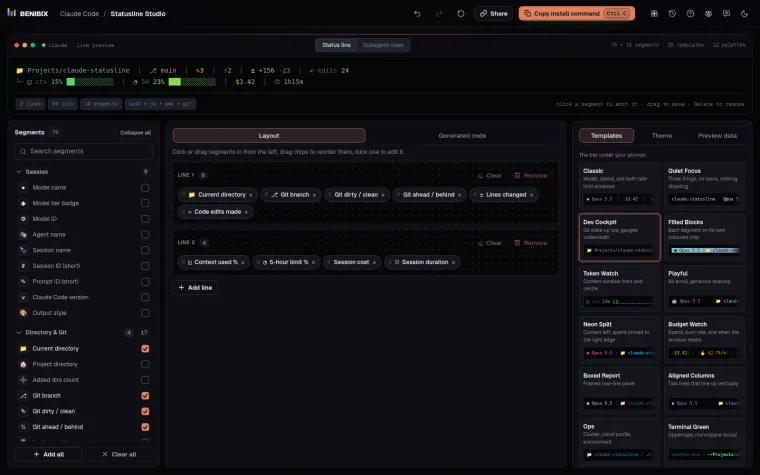
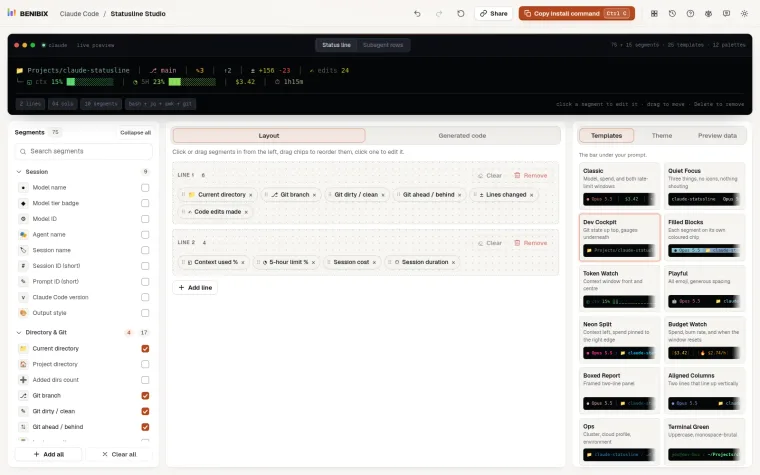
Statusline Studio has context segments ready to drop in: used and remaining as a number, a progress bar or a colour that turns from green to red as it fills, next to tokens, cache reads, cost and rate limits. Pick from 75 segments, watch the line render live, and copy a ready-to-run script in Bash, Python or Node.js.