LivePrompts · free · no sign-up · runs in your browser
Character Prompt Builder
Character Prompt Builder is an AI character prompt builder. You answer a few questions about your character and get ready-to-paste image and video prompts, plus an identity block that keeps the same character across shots.
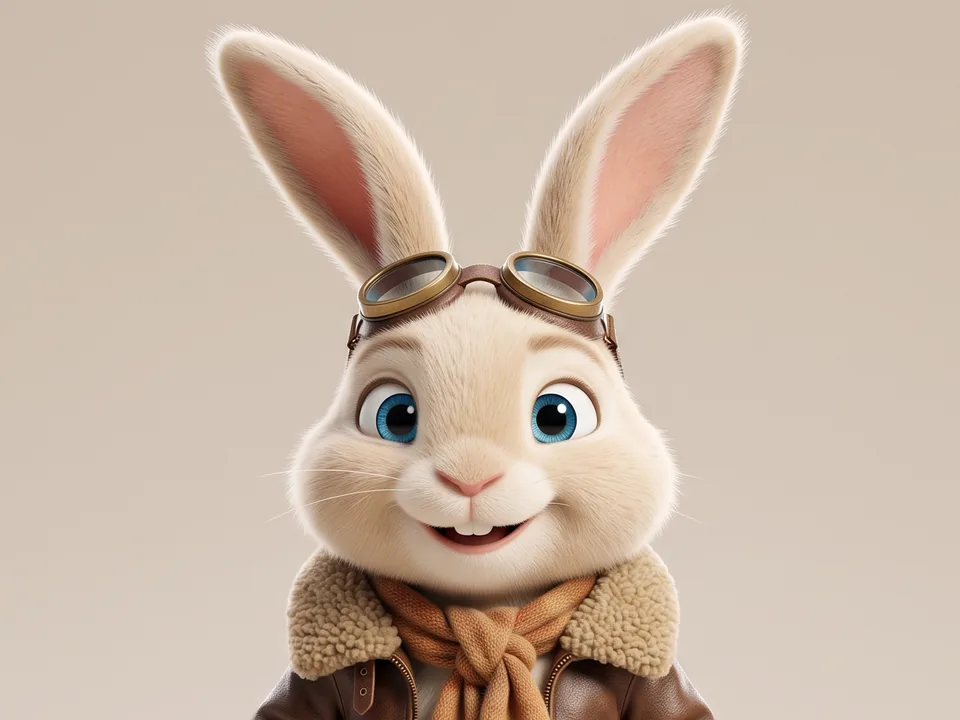
An adult anthropomorphic rabbit, tiny and delicate, cream-coloured fur, ocean blue eyes, a brown leather flight jacket, small brass flight goggles, seamless studio backdrop, softbox lighting, close-up portrait, a warm charismatic smile. An adult anthropomorphic rabbit, tiny and delicate, cream-coloured fur, ocean blue eyes, a brown leather flight jacket, small brass flight goggles, seamless studio backdrop, softbox lighting, close-up portrait, a warm charismatic smile. An adult anthropomorphic rabbit, tiny and delicate, cream-coloured fur, ocean blue eyes, a brown leather flight jacket, small brass flight goggles, seamless studio backdrop, softbox lighting, close-up portrait, a warm charismatic smile.
The same words in every scene, so the face stays the same.
7
kinds of character
99
ready-made characters
19
art styles
3
prompt styles
What it does
What Character Prompt Builder does.
Getting the same character twice from an AI image model is hard, and a vague prompt gives you a different face every time. Character Prompt Builder walks you through six steps, from identity and face to wardrobe, scene, camera and motion, and assembles a precise prompt that any image or video model reads.
It also gives you an identity block that describes only the character, so you can reuse it word for word in new scenes. Or skip the questions: start from one of 99 ready-made characters, from a corporate headshot to a pixel-art knight, and change what you like.
01
Six-step character builder
Choose a person, animal, anthro, animated character, robot, creature or fantasy race. The type reshapes every question after it, so an animal gets coat and markings instead of a haircut.
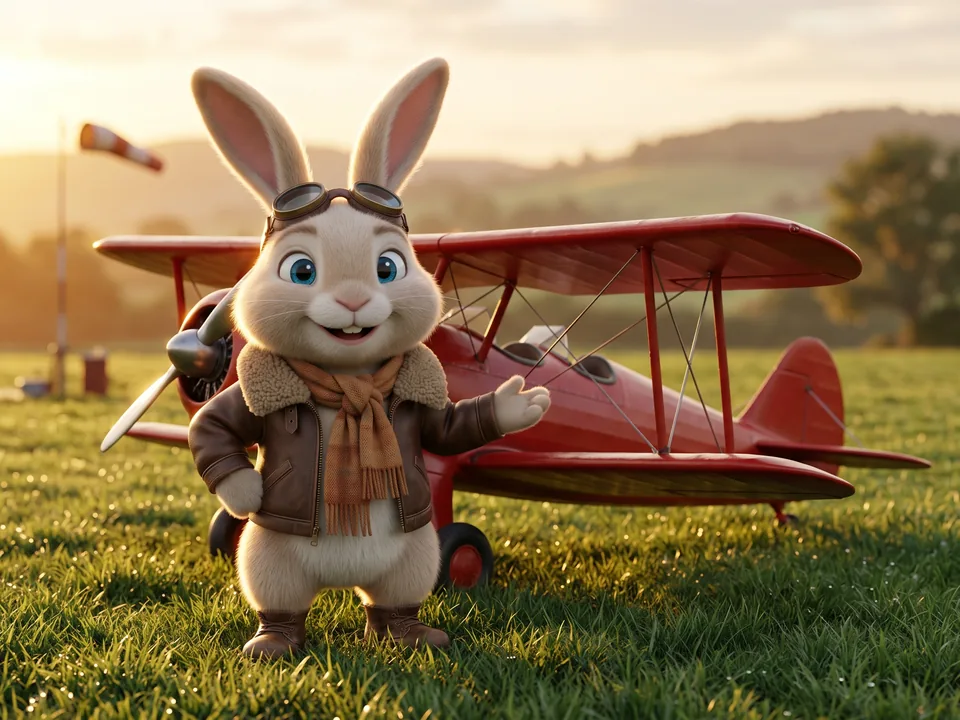
An adult anthropomorphic rabbit, tiny and delicate, cream-coloured fur, ocean blue eyes, a brown leather flight jacket, brass flight goggles in a grassy airfield beside a little red biplane, cowboy shot, Pixar-style 3D, adjusting their jacket collar.
identity block: the same words in every scene
02
Written the way your model reads
Plain sentences work in almost every model. Pick Midjourney for its --ar and --v flags, or Stable Diffusion for lowercase tags with quality words added.
03
Identity block and negative prompt
Reuse the identity block across shots to keep a consistent character. The negative prompt is tuned to the character type, for example hands for people and paws for animals.
04
99 ready-made characters
Every type in every art style, from a cinematic portrait and a studio pet to a claymation kid, a brass clockwork butler and a pixel-art slime king. Filter by type and style, pick one, and the builder opens with every answer filled in.
05
Character sheets in any style
Set the art style to Character sheet and the prompt asks for front, side and back views on one sheet, the reference that keeps a character the same in every later picture.
06
Save, share and come back
Save any character to My characters in this browser, share it as a link or a file, and load it again later with every answer as you left it.
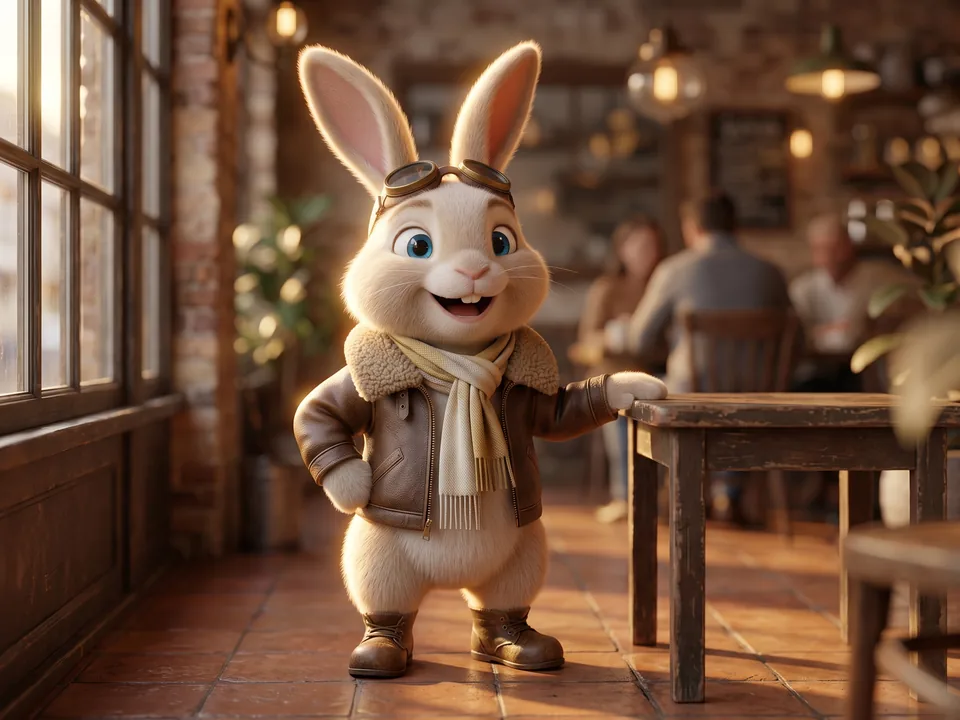
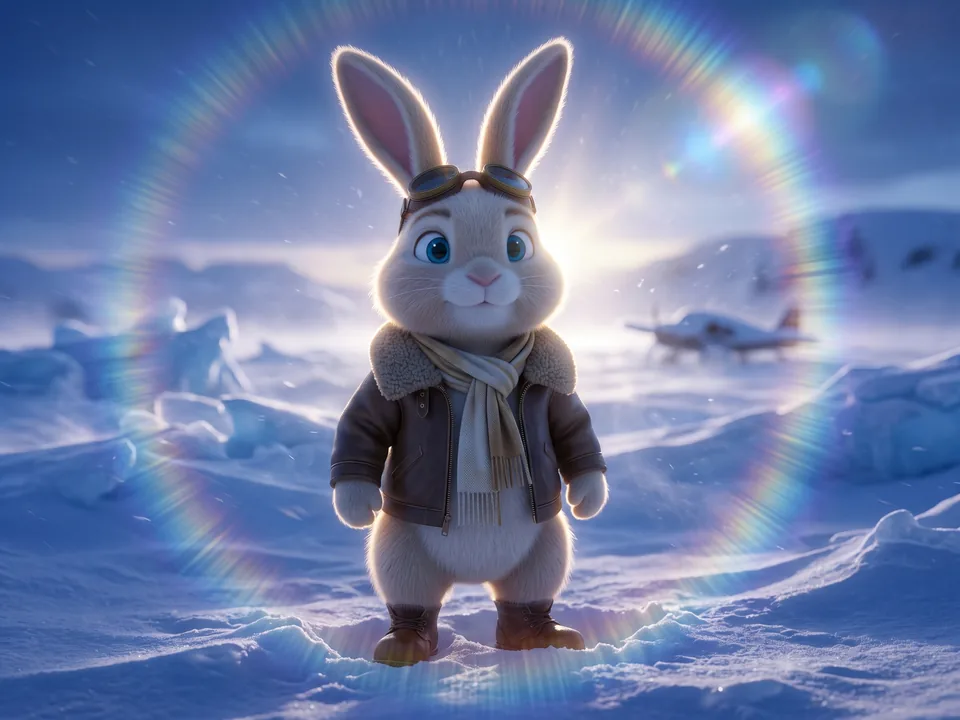
Same face, new scene
One identity block, every scene.
An image model gives you a new character whenever the description changes, even by a word. So the builder splits the prompt in two: the identity block, which describes only the character and never changes, and the scene, which you change as often as you like. Here is one character in three scenes. The lit part is the same in all three.
Airfield at sunriseAI
An adult anthropomorphic rabbit, tiny and delicate, standing upright on two legs like a person. They have cream-coloured fur, a solid, unmarked coat, ocean blue eyes. Wearing a brown leather flight jacket with a sheepskin collar, with small brass flight goggles and a cashmere wool scarf, in worn leather boots.A warm charismatic smile, in a grassy airfield beside a little red biplane, at early sunrise, lit by dramatic rim lighting, cowboy shot.
Café at golden hourAI
An adult anthropomorphic rabbit, tiny and delicate, standing upright on two legs like a person. They have cream-coloured fur, a solid, unmarked coat, ocean blue eyes. Wearing a brown leather flight jacket with a sheepskin collar, with small brass flight goggles and a cashmere wool scarf, in worn leather boots.An open, unguarded laugh, in a sunlit urban café, at golden hour, lit by soft natural window light, medium shot.
Snow at blue hourAI
An adult anthropomorphic rabbit, tiny and delicate, standing upright on two legs like a person. They have cream-coloured fur, a solid, unmarked coat, ocean blue eyes. Wearing a brown leather flight jacket with a sheepskin collar, with small brass flight goggles and a cashmere wool scarf, in worn leather boots.A soft gaze into the camera, in a windswept snowfield, at blue-hour dusk, lit by strong backlighting with lens flare, full body shot.
The three pictures were made with Gemini from the builder's own prompts for Rabbit Pilot, one of its ready-made characters. Pick it under Ready-made in the app to start from the same words and copy its identity block.
In a minute
See Character Prompt Builder in action.
A short video of Character Prompt Builder doing its one job, from an empty screen to the finished result.
Nothing loads from YouTube until you press play. Then Google receives your IP address and may set its own storage. Narrated with an AI-generated voice. Privacy
How it works
How to use Character Prompt Builder in three steps.
Best for: you want to create a character for AI images or video and keep it looking the same from one shot to the next.
01
Pick a type or a ready-made character
Start from a ready-made character or from a blank type, then answer the questions in each step using chips or your own words.
02
Pick a prompt style
Keep plain sentences, or switch to Midjourney flags or Stable Diffusion tags, and the prompt rewrites itself.
03
Copy and reuse
Copy the prompt, then save the character to My characters so you can use the same identity in new scenes.
Course
Learn Character Prompt Builder, from 0 to 100.
A free course of 6 short lessons, from your first minute in Character Prompt Builder to using all of it, with a picture of every step.
A free course on making AI characters that stay the same in every picture and video, from your first character in two minutes to model-ready prompts, character sheets and a library you can share.
First release: build an AI character once, keep the same face everywhere
Character Prompt Builder writes image and video prompts for a character you describe step by step: identity, face, wardrobe, scene, camera and motion.
Seven kinds of character (a person, an animal, an anthro, an animated character, a robot, a creature or a fantasy race), each with its own questions.
99 ready-made characters in every kind and all 19 art styles: pick one and the builder opens with every answer filled in, ready to change, with its picture and name at the top of the live prompt for as long as the character itself stays the same. Every picture was generated with AI (Google Gemini) and says so with an AI mark.
Prompts come in three styles: plain sentences for Flux, Nano Banana, GPT Image, Midjourney v7, Firefly, Veo and Sora, Midjourney phrases with --ar and --v flags, or Stable Diffusion tags.
How do I keep an AI character consistent across images?
Describe the character in detail once, then reuse that exact description in every prompt and change only the scene and camera. Small wording changes to the face, hair or outfit give you a different person, so copy the description word for word. Character Prompt Builder gives you this part as a separate identity block for exactly that reason. If your image tool accepts a reference image, adding one of your earlier results helps too.
What kinds of characters can I build?
You can build 7 types: a person, a real animal, an anthro (an animal that stands upright and wears clothes), an animated character, a robot, an original creature or a fantasy race such as an elf or orc. Each type gets its own questions, and answers that don't apply never end up in the prompt.
Are there ready-made AI characters I can start from?
Yes. There are 99, covering all 7 types and all 19 art styles, from photorealistic portraits and wildlife shots to anime, claymation, pixel art, watercolour and character sheets. Filter them by type and style, pick one and every question is answered for you. Change any answer before you copy the prompt.
Which AI models does it write prompts for?
Any of them. The default is plain sentences, which Flux, Nano Banana, GPT Image, Midjourney v7, Firefly, Veo and Sora all read well. Two more styles are there if you need them: Midjourney, with the --ar and --v 7 flags, and Stable Diffusion tags for SDXL and SD 1.5.
Do I need an API key or an account?
No. The prompt is assembled in your browser from your answers using a local template, so it is instant and costs nothing. You paste the result into whichever image or video tool you already use.
Can I save my characters?
Yes. Save characters to My characters, kept in your browser, and load them back for new scenes. You can also download a character as a file to back it up or share it.
Does it work offline?
Yes. Once you have opened it, your browser keeps a copy of its files, so it opens again and keeps working with no connection. Your characters stay in that browser too.
Is Character Prompt Builder made by one of the companies it names?
No. Character Prompt Builder is independent: it is not made, endorsed or supported by OpenAI, Google, Midjourney or any other company whose products it works with. Product names on this page are their owners' trademarks, used only to say what it works with.
Six-step character builder✦Written the way your model reads✦Identity block and negative prompt✦99 ready-made characters✦Character sheets in any style✦Save, share and come back✦Six-step character builder✦Written the way your model reads✦Identity block and negative prompt✦99 ready-made characters✦Character sheets in any style✦Save, share and come back✦
Six-step character builder✦Written the way your model reads✦Identity block and negative prompt✦99 ready-made characters✦Character sheets in any style✦Save, share and come back✦Six-step character builder✦Written the way your model reads✦Identity block and negative prompt✦99 ready-made characters✦Character sheets in any style✦Save, share and come back✦
Free, no sign-up
Try Character Prompt Builder now.
Character Prompt Builder is an AI character prompt builder. You answer a few questions about your character and get ready-to-paste image and video prompts, plus an identity block that keeps the same character across shots.
 Airfield at sunrise
 Café at golden hour
 Snow at blue hour