Short answer: use a column chart (vertical) for a few categories or a few periods of time, because time reads left to right. Use a bar chart (horizontal) when the category names are long, when there are more than about ten categories, or when you want to rank them, because names fit on the left and a sorted list reads top to bottom like a leaderboard.
What is the difference, in one table?
| Column chart | Bar chart | |
|---|---|---|
| Direction | Vertical columns | Horizontal bars |
| Best for | A few categories, or periods of time | Many categories, long names, rankings |
| Category names | Under the columns, so they must be short | On the left, so they can be long |
| Order | The natural order: time, or a fixed order | Sorted by value, longest first |
| Avoid it for | Long names, many periods (use a line) | Time on the axis |
When is a column chart right?
Columns suit a small number of things in an order the reader already knows: four quarters, the five days of a working week, three product tiers. The heights are easy to compare side by side, and time runs left to right, the way people expect it to.
Past about 12 columns, two things go wrong. The names under them get tilted or cut, and a long run of periods reads better as a line, which shows the trend instead of a row of separate heights.
When is a bar chart right?
Bars win as soon as the names are long or many. "North-East Enterprise Accounts" fits on the left of a bar; under a column it turns into a diagonal label nobody reads. A bar chart also scrolls naturally: twenty or thirty bars in a tall chart are still readable.
Sorted from longest to shortest, a bar chart is a ranking. The first bar is the winner, and the order itself is the message. This is why "top 10 products" is almost always a bar chart.
How do you make either one read well?
- Start the axis at zero. A bar's length is its value; a cut axis makes small differences look huge.
- Sort with a reason. Bars by value, columns by time or by their natural order. Alphabetical order is rarely the point.
- Label the values and drop the axis. With a number at the end of each bar, the axis and the gridlines become clutter.
- One colour. Colour every bar the same, and use a second colour only to point at one: your team, this month, the one below target.
What are they called in Power BI, Tableau and Excel?
| Chart | Power BI | Tableau | Excel |
|---|---|---|---|
| Column chart | Clustered column chart | Bar chart, with the dimension on Columns | Insert, Column, Clustered Column |
| Bar chart | Clustered bar chart, sorted by the value | Bar chart (horizontal bars), sorted descending | Insert, Bar, Clustered Bar |
Power BI calls vertical bars "columns" and horizontal ones "bars". Tableau calls both "bar chart" and decides the direction by which shelf the dimension is on. Excel uses the same names as Power BI.
Where can you check this?
Not sure for your data?
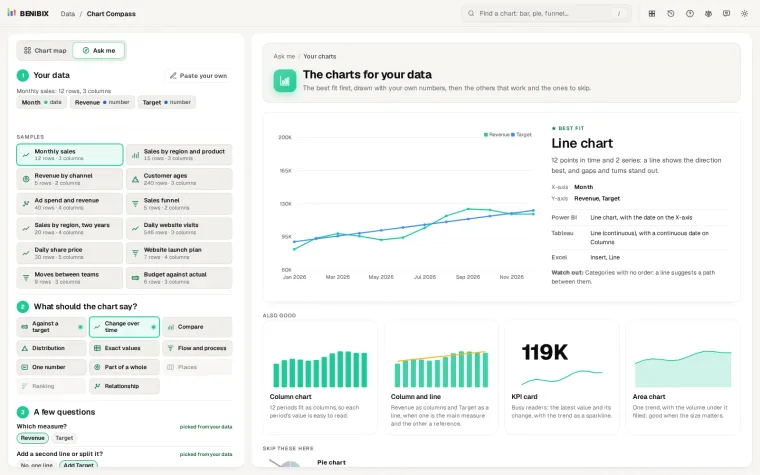
Paste the table into Chart Compass, say what the chart should show (compare, rank, change over time) and it picks between these two and the other charts that fit, drawn with your numbers, with the reason and where each field goes. With more than seven categories, or names longer than about ten characters, it puts the bar chart first; with a few short ones, the column chart. Past twelve periods it warns that columns turn into a barcode and suggests a line.