Short answer: Put it inside an HTML tag with align="center", for example <p align="center"><img src="logo.png" width="120" alt="Logo"></p>. GitHub removes style attributes and stylesheets from a README, so text-align: center does nothing; the old align attribute is what still works, for images, text, headings and tables.
You add style="text-align: center", or a <center> tag, and it looks right in your editor. You push, open the repository, and everything sits on the left again. Nothing is wrong with your HTML: GitHub just throws that part away.
Why doesn't CSS work in a GitHub README?
GitHub turns your Markdown into HTML and then sanitizes it. Its markup README says that step aggressively removes things like script tags, inline styles, and class and id attributes. With no style, no class and no stylesheet, CSS has nowhere to go.
What is left are the HTML attributes from before CSS existed, and align is one of them. MDN calls align on a paragraph obsolete, and in a web page you would use CSS instead. In a README there is no instead: in the html-pipeline sanitizer, align is on the list of attributes every allowed tag may keep, while style is on no list and <center> is not an allowed tag.
How do you centre an image?
Wrap it in a paragraph and centre the paragraph:
<p align="center">
  <img src="docs/logo.png" width="120" alt="Project logo">
</p>width sets the size and the height follows. To make the image a link, put an <a href="..."> around the <img>, inside the paragraph.
Do not put align="center" on the <img> itself. On an image, align was never horizontal centring: MDN lists its values as top, middle and bottom (vertical position) and left and right (float). The centring comes from the block around it.
Two screenshots side by side, centred, work the same way:
<p align="center">
  <img src="docs/light.png" width="45%" alt="The app in light mode">
  <img src="docs/dark.png" width="45%" alt="The app in dark mode">
</p>How do you centre a heading and text?
A Markdown heading (# Title) cannot carry an attribute, so a centred heading is written in HTML:
<h1 align="center">Project name</h1>
<p align="center">One line on what it does, <b>in bold</b> where it matters.</p>Inside an HTML tag on one line, Markdown is not read: **bold** shows its asterisks and [text](link) stays as typed. Use <b>, <i>, <a href="..."> and <br> there, or the trick below.
How do you keep Markdown working inside a centred block?
Leave a blank line after the opening tag and before the closing one:
<div align="center">
**Fast**, small and [documented](docs/README.md).

</div>GitHub follows the GitHub Flavored Markdown spec, where an HTML block like <div> ends at the first blank line. Everything after it is Markdown again, until </div> closes the block. Without the blank lines, the whole thing counts as HTML and the Markdown is shown as plain text.
How do you centre a table?
There are two different things you may mean.
The text in a column. Put colons on both sides of the dashes in the line under the header. :---: centres a column, ---: aligns it right:
| Plan | Price | Seats |
|:-----|:-----:|------:|
| Free | €0    |     1 |
| Team | €8 | 10 |The whole table on the page. Write the table in HTML and start it with <table align="center">; the colons only move the text inside the cells.
What does not work, and why?
| You try | What happens on GitHub |
|---|---|
style="text-align: center" | The style attribute is removed |
<center>...</center> | Not an allowed tag, so it does nothing |
class="text-center" | The class attribute is removed |
align="center" on the <img> | No horizontal centring: on an image, align sets vertical position or float |
Markdown inside <p align="center"> on one line | Shown as typed; use HTML tags, or a <div> with blank lines |
To see the real result before you push, edit the file on github.com and open the Preview tab: it renders the way the repository page will. An editor's preview may keep what GitHub removes. Images that should change with the visitor's theme need one more step, covered in Dark mode images in a GitHub README.
Where can you check this?
- github/markup: how a README becomes HTML
- html-pipeline: the sanitization filter's allowed tags and attributes
- GitHub Flavored Markdown spec: HTML blocks and tables
- MDN: the p element (align is obsolete)
- MDN: the img element (align values)
Can you centre a whole profile README without writing the HTML?
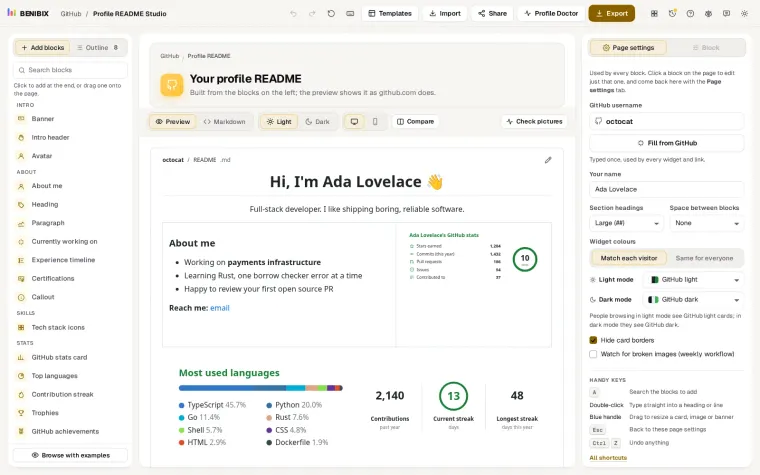
In Profile README Studio, the blocks that can be centred have an Alignment setting with Left and Center. Pick Center and the studio writes the <h1 align="center">, <p align="center"> or <table align="center"> for you, and its pixel-accurate preview shows the result before you copy it to GitHub. It has 31 layouts, 45 block types and 57 themes to start from.