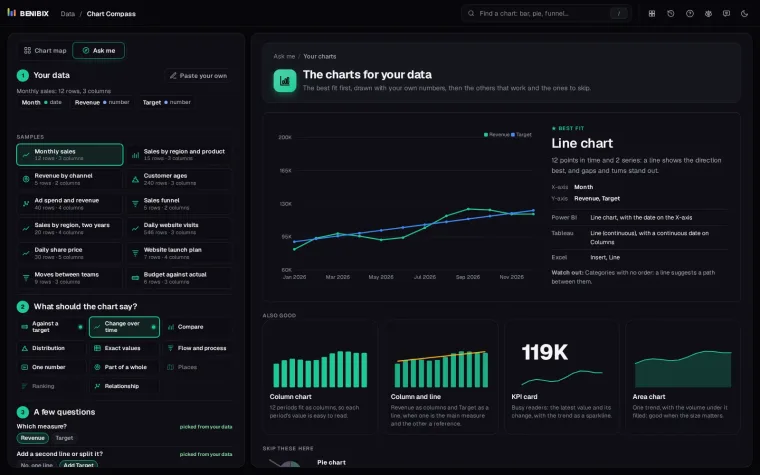
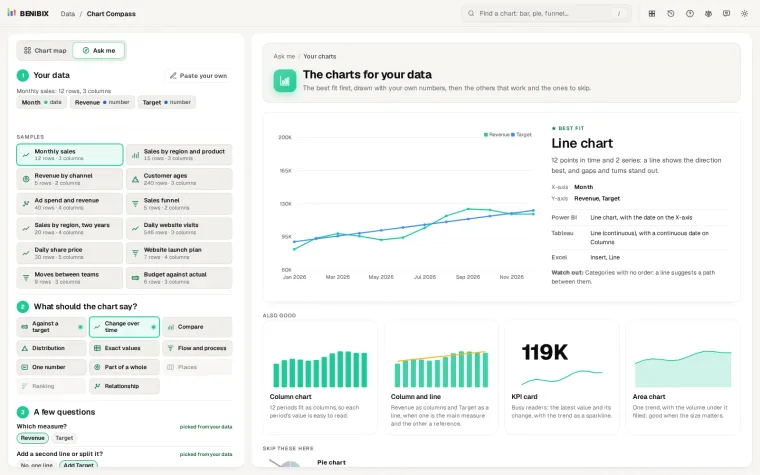
Short answer: choose a chart by what it has to say, then check that your data fits. Change over time is a line. Comparing categories is a bar or column chart. Part of a whole is a stacked bar, or a donut when there are only a few parts. A relationship between two numbers is a scatter plot. Almost every bad chart starts the other way round, with a chart type someone liked and data squeezed into it.
Here are the questions a chart can answer, the chart for each, and what to watch out for.
First: what should the reader take away?
Write the takeaway as one sentence before you pick anything. "Revenue grew every month except August." "The North sells twice as much as the South." "Customers who see more ads spend more." The sentence tells you the question, and the question tells you the chart.
What can a chart say?
| The chart should say | Use | Avoid |
|---|---|---|
| Compare categories | Bar (long names) or column chart, sorted | Pie with many slices, 3D bars |
| Change over time | Line chart; column chart for few periods | Pie, unordered bars |
| Part of a whole | Stacked bar, 100% bar; donut for two to five parts | Pie with ten slices |
| Distribution | Histogram, box plot | Average alone |
| Relationship between two numbers | Scatter plot, with a trend line if it helps | Two lines on two axes |
| Ranking | Sorted bar chart | Unsorted anything |
| Against a target | Bullet chart, bar with a target line, gauge sparingly | Traffic lights alone |
| Flow and process | Funnel, waterfall, Sankey | Stacked columns |
| One number | A KPI card, with its change and a sparkline | A chart for one value |
| Places | Filled map for rates, bubble map for amounts | Filled map for totals |
| Many details | A table, with conditional formatting | A chart with 40 series |
Which questions settle it?
Once you know the goal, two or three questions about the data decide between the candidates:
- How many categories? Up to about five, most charts work. Past ten, use a bar chart and sort it, or group the small ones into "Other".
- Is there an order? Months, age groups and funnel steps have one. A line only makes sense along an order; for categories without one, a line invents a path that is not there.
- How many series? One or two lines read well. Five lines in five colours is a puzzle; show small multiples instead.
- Totals or rates? A map coloured by total sales mostly shows where people live. Colour by a rate (sales per customer) or use bubbles for totals.
Which charts usually mislead?
- Pie charts with many slices. People are poor at comparing angles. Past five slices, a sorted bar chart says the same thing more clearly.
- Truncated bar axes. A bar's length is its value, so a bar axis should start at zero. Line charts can zoom in; bar charts should not.
- Dual axes. Two lines on two scales can be made to cross anywhere you like. Use two charts side by side.
- 3D anything. Depth distorts size and adds nothing.
What is it called in your tool?
The same chart has different names in different tools, which makes following advice harder than it should be. A few that trip people up:
| Chart | Power BI | Tableau | Excel |
|---|---|---|---|
| Horizontal bars | Clustered bar chart | Bar (dimension on Rows) | Clustered Bar |
| Bars with a line | Line and clustered column | Dual axis | Combo |
| Waterfall | Waterfall chart | Gantt bars with a running total | Waterfall |
| Box plot | (a custom visual) | Box plot | Box and Whisker |
Where can you check this?
What is the short version?
- Write the takeaway first, as one sentence.
- Match the sentence to one of the eleven goals.
- Let the number of categories, the order and the number of series decide the rest.
- Start bar axes at zero, and skip pies with many slices, dual axes and 3D.
Chart Compass does this with you: paste your data, pick what the chart should say, answer the two or three questions it cannot answer from the data itself, and it draws the charts that fit with your own numbers, with their names in Power BI, Tableau and Excel and the charts to skip for your data.