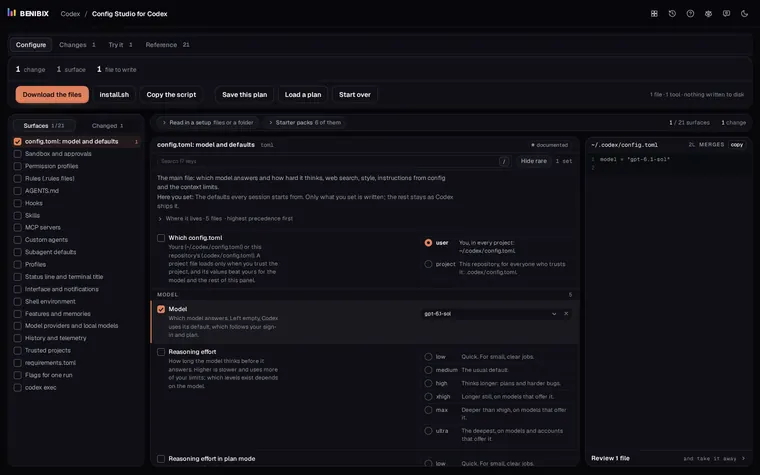
Short answer: Use GPT-6.1 Sol (gpt-6.1-sol) where your plan has it, Luna for clear, repeated jobs, and Astra for the hardest work. Start at the default reasoning effort and raise it only when a task needs more planning. Switch both in the CLI with /model, or set them in ~/.codex/config.toml: model = "gpt-6.1-sol" and model_reasoning_effort = "medium".
Codex gives you two dials: which model answers, and how long it thinks before it does. Turning both up for everything is the common mistake: higher effort is slower and uses more of your limits, and for a small, clear change it rarely gives a better result.
Which Codex model should you use?
OpenAI's own advice, from its Codex models page:
| Model | Use it for | Notes |
|---|---|---|
Astra (gpt-6-astra) | The hardest end-to-end work that needs sustained reasoning and judgment | The most capable |
GPT-6.1 Sol (gpt-6.1-sol) | Complex coding and long-running work when cost matters | "Near-Astra performance" at a lower cost; the recommended default where available |
Luna (gpt-6-luna) | Clear, repeatable jobs: extraction, classification, transformation, focused coding | The most efficient |
GPT-6.1 Sol launched for Plus, Pro, Business, Enterprise and Edu (on Enterprise and Edu an administrator turns it on); Free and Go were not included at launch, and OpenAI points them to Luna in the desktop app. Which models you see depends on your plan, client and workspace.
Which reasoning effort should you pick?
| Effort | In the app | Good for |
|---|---|---|
low | Light | Quick, well-scoped tasks |
medium | Medium | More planning, still quick |
high | High | Hard work with several steps, sources or trade-offs |
xhigh | Extra High | The same, harder |
max | Max | The hardest single problems, when depth matters more than speed or usage |
ultra | Ultra | Big tasks that split into parts: it runs subagents in parallel |
Not every model offers every level: Luna goes up to Max but not Ultra. OpenAI's starting points are the default effort for GPT-6.1 Sol, High for Luna and Light (low) for Astra. Efforts also do not map one-to-one between model generations, so after switching models, try a familiar task at a lower setting first. In the CLI, /model, then a model, then More reasoning… shows its Max or Ultra options.
How do you set the model and effort?
| Where | How | Lasts |
|---|---|---|
| In a session | /model | This session |
| At launch | codex -m gpt-6-luna | This run |
| At launch, any key | codex -c model_reasoning_effort="high" | This run |
| In a script | codex exec -m gpt-6.1-sol "Review the current changes" | This run |
| As your default | ~/.codex/config.toml | Every run |
The config file, with the related keys:
model = "gpt-6.1-sol"
model_reasoning_effort = "medium"

# Plan mode can think harder than the edits that follow it
plan_mode_reasoning_effort = "high"

# How much of its reasoning Codex shows: auto, concise, detailed or none
model_reasoning_summary = "concise"Without a model line, the desktop app, CLI and IDE extension use a recommended model, and they all read the same config.toml. For a setup you switch to by name (a deep review at high effort, a quick fix at low), make a Codex profile instead of editing the file each time.
Why does Codex say my model is not available?
Because several model names stopped working for ChatGPT sign-in this year. Replace them in config.toml, profiles, custom agents, scheduled tasks and scripts:
| Old name | Status | Replace with |
|---|---|---|
gpt-5.5 | Retired 14 Oct 2026 | gpt-6.1-sol, or gpt-6-luna on Free and Go |
gpt-5.3-codex-spark | Retired 14 Sep 2026 | An available model |
gpt-5.4 | Retired 31 Aug 2026 | gpt-6-sol |
gpt-5.4-mini | Retired 31 Aug 2026 | gpt-6-luna |
gpt-5.2, gpt-5.3-codex | Deprecated | An available model |
These dates apply to Codex with ChatGPT sign-in. With an API key, the models your API organisation has keep working.
Where can you check this?
Can you set the model, effort and the rest of config.toml in one place?
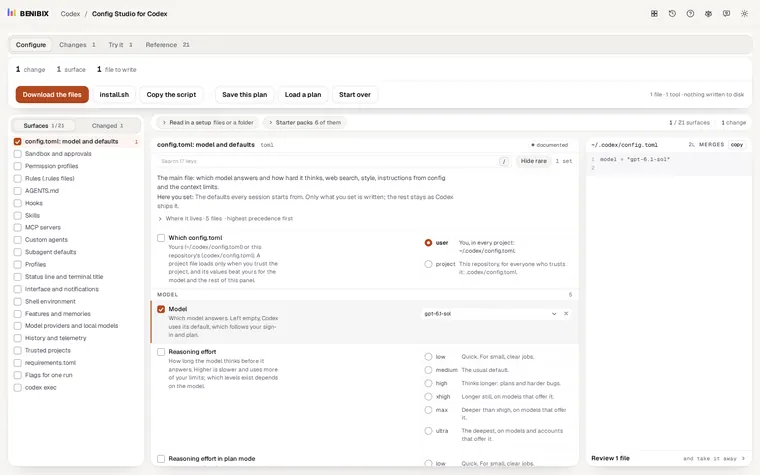
Config Studio for Codex has the model, the reasoning effort, the effort for plan mode and the reasoning summaries with Codex's other settings, each explained, and writes config.toml or a profile for you, checked against Codex 0.162.1. Nothing is written to your computer until you run its install script yourself.