Short answer: GPT-6.2 is two models. GPT-6.2 Astra is for demanding work: tracing a bug across services, implementing and testing a change across a large codebase. GPT-6.2 Sol is for everyday coding and writing, and costs fewer credits per token than Astra at Standard speed. Start Codex with codex -m gpt-6.2-sol (or gpt-6.2-astra), switch inside a session with /model, and make one your default with model = "gpt-6.2-sol" in ~/.codex/config.toml.
Each new model release brings the same question: do I switch everything to the big one? With GPT-6.2 the answer from OpenAI's own docs is no. Sol is the everyday model, and Astra is the one you call in for the hard jobs.
Checked against OpenAI's Codex models page and changelog on 23 November 2026.
What is the difference between Astra and Sol?
| GPT-6.2 Astra | GPT-6.2 Sol | |
|---|---|---|
| OpenAI's pick for | Demanding projects across code, apps and research | Everyday coding, writing and multistep work |
| Example from the docs | Trace a bug across services, fix it and test the change | Edit code, draft a report, turn notes into a plan |
| Cost | More credits per token | Fewer credits per token than Astra at Standard speed |
| Codex id | gpt-6.2-astra | gpt-6.2-sol |
OpenAI's changelog adds one more line for Sol: with GPT-6.2 Sol you can complete more tasks on the same paid plan than with GPT-6.1 Sol. For most people that makes Sol the new default and Astra the model you switch to when Sol gets stuck.
Where can you use them?
Both are in ChatGPT Work and in Codex, in the app and the CLI, on supported plans and clients. Codex CLI 0.171.0, released on 20 November 2026, added GPT-6.2 Sol and Astra to the model catalog with Sol as the default selection. Update the CLI if you do not see them:
npm install -g @openai/codex@latestOn the Pro plans there is also an Ultrafast speed: Pro $200 subscribers can use it with GPT-6.2 Sol, Pro $500 subscribers with both models. In Enterprise and Edu workspaces, an administrator may have to enable a new model first.
How do you pick a model in Codex?
For one session, at the start:
codex -m gpt-6.2-astra-m is short for --model, and it works for scripted runs too:
codex exec -m gpt-6.2-sol "Review the current changes"Inside a running session, type /model to switch the model or change the reasoning effort. The docs suggest starting with the default effort and raising it only when a task needs deeper planning.
How do you make one your default?
Put the model at the top of ~/.codex/config.toml:
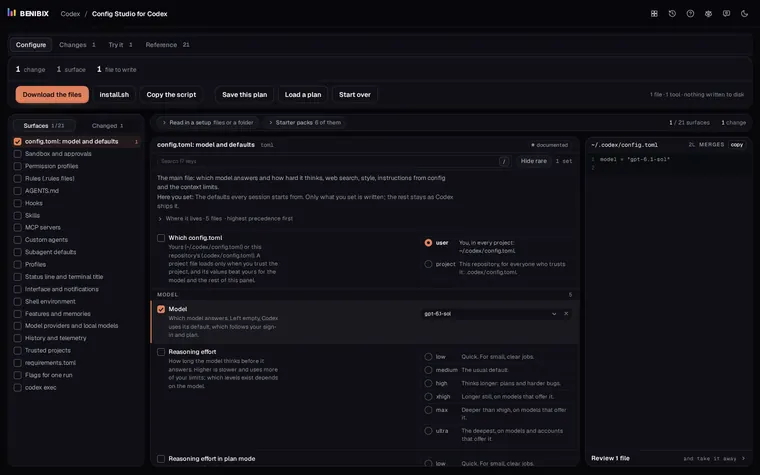
model = "gpt-6.2-sol"Every new session in the CLI, the IDE extension and the ChatGPT desktop app then starts with Sol. To keep Astra one step away, make a profile: a file named ~/.codex/deep.config.toml holding only
model = "gpt-6.2-astra"and start a hard session with codex --profile deep. Old guides put profiles in [profiles.deep] tables inside config.toml; current Codex no longer reads those (see Codex profiles).
Should you switch right away?
Try both on your own work before you change a team-wide default. Run the same two or three real tasks you know well, a bug fix, a refactor, a review, with Sol and with Astra, and compare the result and the credits used. A model that wins benchmarks can still be the wrong default for your codebase.
Where can you check this?
- OpenAI docs: Models, what Astra and Sol are for, the credit difference and the
-mand/modelcommands - OpenAI: Codex changelog, GPT-6.2 in Codex CLI 0.171.0 with Sol as the default, more tasks per plan than GPT-6.1 Sol, and Ultrafast on Pro
Can you set the model, the profile and the effort in one place?
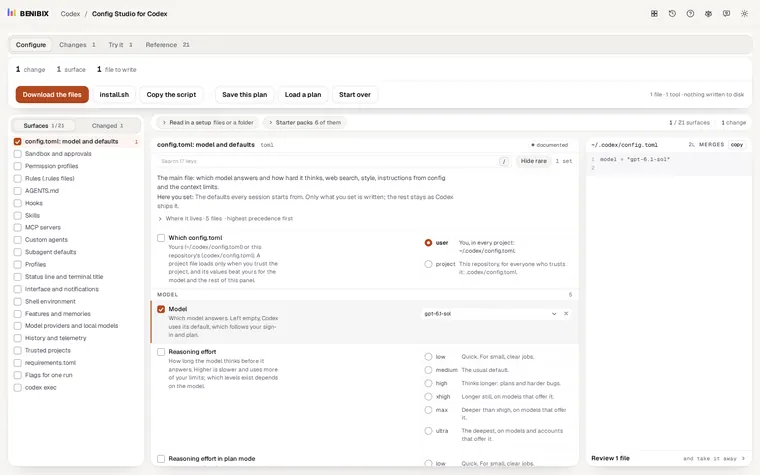
Yes. Config Studio for Codex explains every key in config.toml, profiles and reasoning effort included. Type the new model name and it writes the lines for you to copy. For how to choose the effort level, see Codex model and reasoning effort.